scani5 Agent Installation (Linux)
Step-by-step guide to install, configure, and verify the scani5 Linux Agent on Debian/Ubuntu (.deb) and RHEL/CentOS (.rpm) endpoints. The agent runs as a background system service, providing continuous endpoint visibility, software and patch inventory, identity exposure monitoring, and security configuration assessment.
Table of Contents
- Deployment Overview
- Debian & Ubuntu Installation (.deb)
- RHEL, CentOS, Rocky Linux & Fedora Installation (.rpm)
- Verify Installation
- Service Operations & Complete Purge
1. Deployment Overview
The scani5 Agent can be deployed using either of the following methods:
| Method | Description |
|---|---|
| Option 1: Manual / Interactive Package Installation (covered in this guide) | Direct terminal installation using native package managers (dpkg for Ubuntu/Debian or rpm for RHEL/CentOS) on individual endpoints. |
| Option 2: Enterprise Automated Fleet Rollout | Silent, non-interactive deployment across server clusters using Ansible, Puppet, Chef, Terraform, or Bash automation scripts with pre-seeded organization keys. |
| Operating System | Package Type |
|---|---|
| Ubuntu, Debian | .deb (e.g. Scani5_1.0.0.deb) |
| RHEL, CentOS, Rocky Linux, AlmaLinux, Fedora | .rpm (e.g. Scani5_1.0.0.rpm) |
Ensure the target machine has outbound HTTPS access (TCP 443) and administrative (sudo) credentials available.
2. Debian & Ubuntu Installation (.deb)
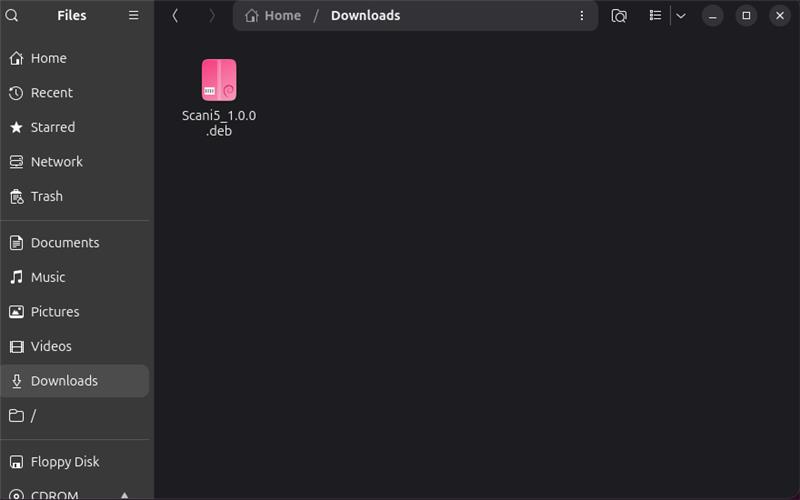
Step 1: Locate the downloaded package
Navigate to the directory where the installer package was saved (for example, the Downloads folder) and confirm that Scani5_1.0.0.deb is present.
Step 2: Open a terminal and navigate to the package
cd ~/Downloads
ls
Step 3: Run the installer
sudo dpkg -i Scani5_1.0.0.deb
Step 4: Enter organization hash
The installer unpacks the binaries, configures file permissions, and presents the scani5 Agent Configuration prompt. Paste your Organization Hash and press Enter.
=================================================================
                  Scani5 Agent Configuration
=================================================================
Please enter your Scani5 Organization Hash:
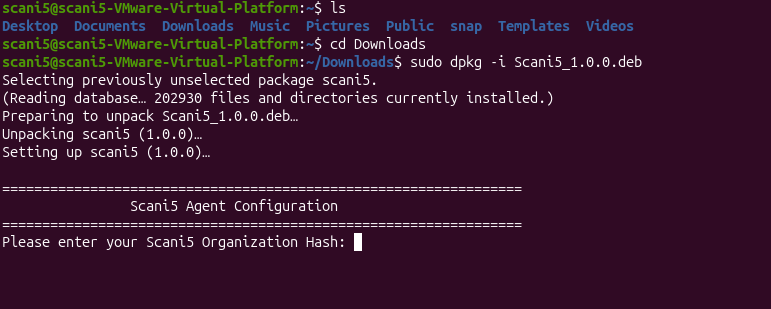
The installer writes the Organization Hash to /root/Scani5/Scani5Agent/Scani5Org.txt with restricted 0600 permissions, reloads systemd, enables the service to start on boot, and immediately launches the agent.
3. RHEL, CentOS, Rocky Linux & Fedora Installation (.rpm)
On RHEL, CentOS, Rocky Linux, AlmaLinux, and Fedora systems, the agent is distributed as an RPM package.
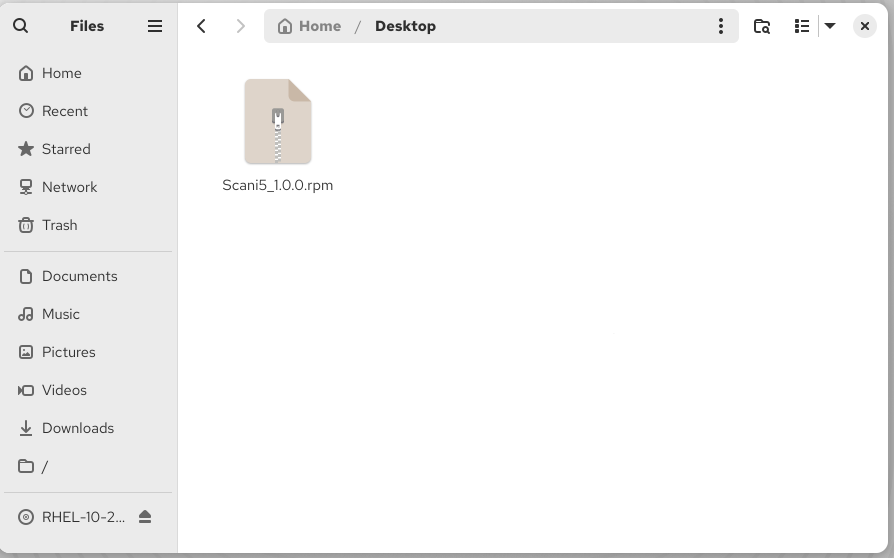
Step 1: Locate the RPM package
Confirm that Scani5_1.0.0.rpm has been transferred to the target machine (for example, to the Desktop or /tmp).
Step 2: Run the installer
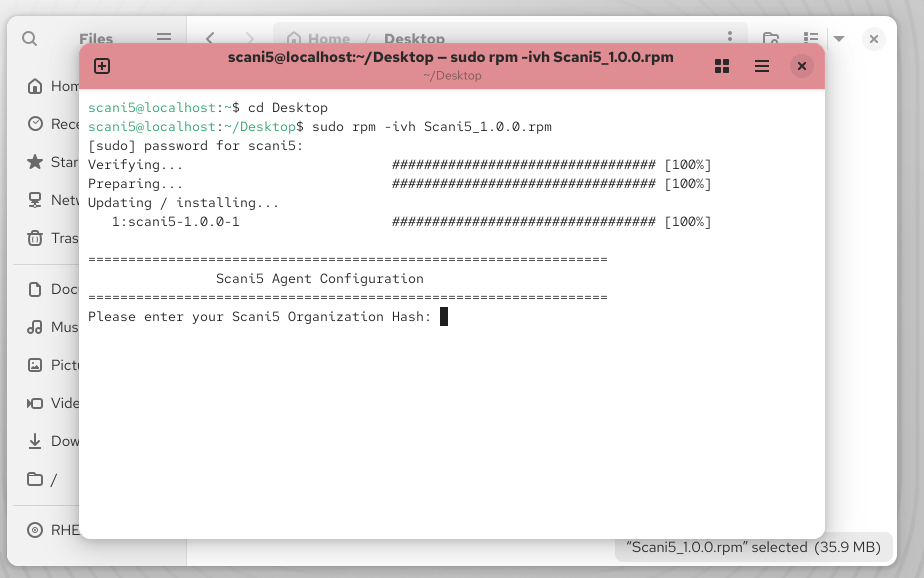
Open a terminal, navigate to the folder containing the package, and run:
cd ~/Desktop
sudo rpm -ivh Scani5_1.0.0.rpm
Step 3: Enter organization hash
The installer verifies the package, prepares the file layout, and displays the configuration prompt. Paste your Organization Hash and press Enter.
4. Verify Installation
The scani5 Linux Agent runs silently in the background as a headless systemd daemon under the root account. Use the checks below to confirm the agent is healthy.
Check service status
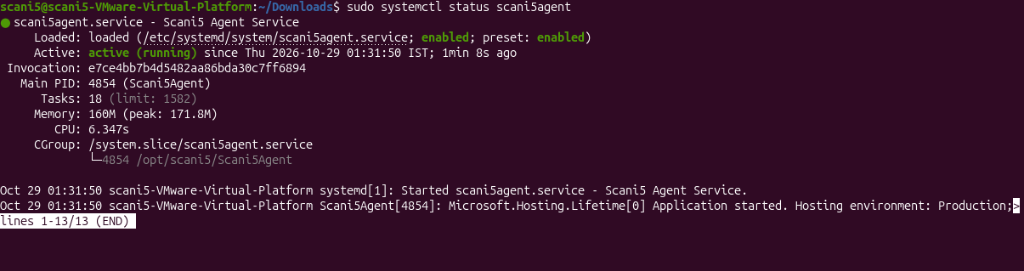
sudo systemctl status scani5agent
Ubuntu / Debian:
RHEL / CentOS:
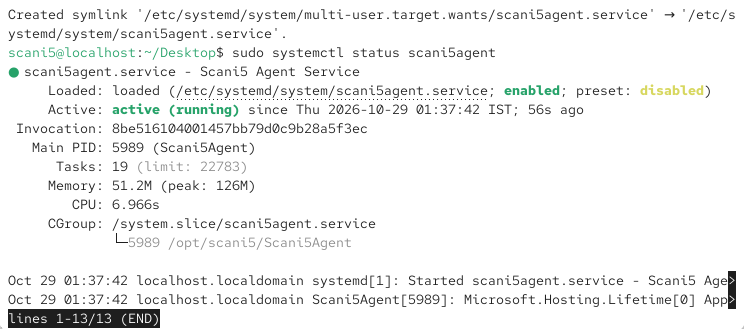
Confirm the output matches the expected values below:
| Attribute | Expected State | Description |
|---|---|---|
| Service Name | scani5agent.service | systemd unit registered under /etc/systemd/system/. |
| Loaded | loaded (...; enabled) | Service starts automatically on every reboot. |
| Active | active (running) | Daemon is actively running background security watchers. |
| Main PID | Integer (e.g. 4854) | Process ID of /opt/scani5/Scani5Agent. |
| Memory | 50 MB – 160 MB | Healthy resident memory footprint. |
Check the agent log
Verify that registration, secret negotiation, and the initial inventory push succeeded:
sudo tail -n 20 /root/Scani5/Logs/Scani5_Log.txt
Expected output:
App Version: 1.0.0
First run detected. Initiating registration.
Agent registered and secret saved.
Collecting Software inventory.
Initial inventory successfully sent.
Initial User Profile details successfully sent.
Configuration assessment completed.
Check the running process
ps aux | grep -i Scani5Agent | grep -v grep
Expected output:
root 5989 0.2 1.8 160520 51200 ? Ssl 01:37 0:06 /opt/scani5/Scani5Agent
5. Service Operations & Complete Purge
| Operation | Command |
|---|---|
| Check service status | sudo systemctl status scani5agent.service |
| Restart the agent | sudo systemctl restart scani5agent.service |
| Stop the agent | sudo systemctl stop scani5agent.service |
| Stream live logs | sudo journalctl -u scani5agent.service -f |
| Complete purge (Ubuntu / Debian) | sudo apt purge -y scani5 (stops service & deletes all DB/cache) |
| Complete purge (RHEL / CentOS) | sudo rpm -e scani5 (stops service & deletes all DB/cache) |